Honest Teachable Review: Pros, Cons & Features
If you’ve been thinking about creating an online course or selling your knowledge on the internet, there’s a good chance you’ve come across Teachable. It’s one of the most established platforms in the online education space, and it’s often recommended for beginners and creators who want a simple way to launch and sell courses without dealing with technical headaches.
But with so many course platforms available today, it’s fair to ask a real question: is Teachable actually worth it, or is it just popular because it’s been around for a long time? Let’s break it down in a clear, honest, and practical way so you can understand what it does well, where it falls short, and whether it fits your goals.
What Is Teachable?
Teachable is an online course platform that allows creators, coaches, and educators to build and sell digital courses, coaching programs, and memberships.
Instead of building a website from scratch or dealing with complicated hosting and payment systems, Teachable gives you everything in one place. You can upload videos, create lessons, set pricing, and sell directly to students.
It handles the technical side of things like video hosting, checkout pages, and payment processing so you can focus more on content creation and marketing.
Over time, Teachable has evolved from a simple course builder into a more complete business platform, adding features like upsells, affiliate programs, and integrated payment systems.
At its core though, it still focuses on one main goal: helping creators sell knowledge online.
Key Features of Teachable
One of Teachable’s strongest points is that it bundles a lot of essential features into a single platform.
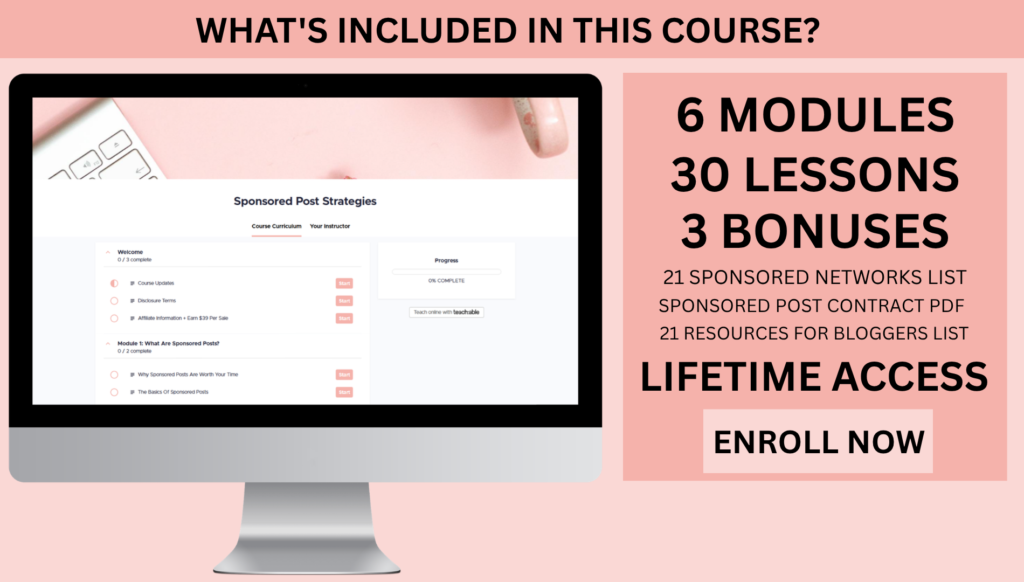
You can create structured courses with lessons, modules, and downloadable resources. The course builder is straightforward, allowing you to upload videos, add text, and organize content in a way that feels logical for students.
It also includes built-in video hosting, which means you don’t need to rely on external platforms like Vimeo or YouTube for private content delivery.
Another important feature is the checkout system. Teachable allows you to create sales pages and payment flows where students can purchase your course directly. This includes support for coupons, payment plans, and bundles.
You also get marketing tools like affiliate programs, which let other creators promote your course in exchange for commissions.
On higher plans, Teachable also includes tax handling and payment processing tools that make it easier to sell internationally without worrying about compliance issues.
Overall, it’s designed to be an all-in-one solution for selling and delivering online education.
Ease of Use and Setup Experience
One of the main reasons people choose Teachable is its simplicity.
The platform is designed for non-technical users, which means you don’t need coding skills or web development experience to get started.
Setting up a course is fairly straightforward. You create a course, add sections, upload content, and publish it. The interface guides you through the process step by step.
The dashboard is clean and organized, which makes it easier to manage courses, students, and sales in one place.
However, while it is beginner-friendly, it does have limits. If you want advanced customization or complex learning structures, you may start to feel restricted.
But for most beginners, the simplicity is actually a major advantage because it removes a lot of overwhelm.
Pricing and Value for Money
Teachable operates on a subscription model, meaning you pay monthly or annually depending on the plan you choose.
There are different tiers, and each one unlocks more features while reducing transaction fees.
Lower-tier plans usually include transaction fees on each sale, which can add up if your course starts generating consistent income. Higher-tier plans remove those fees but come with a higher monthly cost.
This structure means Teachable becomes more cost-effective as your business grows, but it can feel expensive for beginners who are just starting out.
Some users find that they only fully benefit from the platform once they are generating steady sales, rather than during the early experimentation phase.
So in terms of value, it really depends on where you are in your journey.
Pros of Teachable
One of the biggest strengths of Teachable is how easy it is to get started. You don’t need technical knowledge, and you can launch a course quickly without hiring developers or designers.
Another major advantage is the all-in-one structure. You get course hosting, payments, student management, and basic marketing tools in one platform, which reduces the need for multiple tools.
The student experience is also strong. Courses are clean, mobile-friendly, and easy to navigate, which helps improve completion rates.
Teachable also handles payments and taxes in a way that simplifies international selling, which is a big benefit for creators with global audiences.
Affiliate marketing tools are another strong point, allowing you to scale your reach without heavy advertising costs.
Overall, it’s a platform built for simplicity and conversion rather than complexity.
Cons of Teachable
Despite its strengths, Teachable does have some noticeable limitations.
One of the most common complaints is transaction fees on lower plans. These fees can reduce profits significantly if you are making consistent sales.
Another limitation is customization. While the platform is functional, design flexibility is somewhat restricted compared to more advanced website builders.
Teachable is also not ideal for complex learning environments. If you want advanced quizzes, interactive learning paths, or community-driven engagement features, you may find it lacking.
Email marketing features are relatively basic, meaning many creators still rely on external tools for advanced automation and segmentation.
There are also some user concerns around pricing changes and platform updates over time, which can affect long-term planning for serious businesses.
In simple terms, Teachable works very well within its intended scope, but it is not designed to be a fully customizable business ecosystem.
Who Teachable Is Best For
Teachable is best suited for beginners and intermediate creators who want a simple way to launch and sell online courses.
It works especially well for coaches, educators, and creators who are focused on structured content delivery rather than complex community platforms.
If your goal is to quickly validate a course idea or start selling digital education without technical stress, Teachable is a strong option.
It is also a good fit for creators who value simplicity over customization and want a platform that handles most of the technical work for them.
However, if you are building a large-scale education business or want advanced marketing and community features, you may eventually need something more flexible.
Real-World User Experience
In real-world use, most creators describe Teachable as reliable and straightforward.
Many users appreciate that once everything is set up, the platform runs smoothly in the background without constant maintenance.
At the same time, some experienced creators mention that they eventually outgrow it as their business becomes more complex.
This creates a common pattern. Teachable is often loved at the beginning of a creator’s journey but becomes limiting as they scale.
That doesn’t mean it stops working. It simply means their needs evolve beyond what the platform is designed to provide.
Teachable is a legitimate and well-established online course platform that makes it easy to create, sell, and deliver digital education products.
Its biggest strengths are simplicity, reliability, and an all-in-one setup that removes technical barriers for beginners.
However, it is not the most flexible or advanced platform available today. Limitations in customization, marketing automation, and community features mean it is best suited for straightforward course businesses rather than complex digital ecosystems.
If you are just starting out and want a clean, easy way to launch your first course, Teachable is absolutely worth considering.
If you are building a more advanced online education business with deep customization and marketing needs, you may eventually need to look at more powerful alternatives.
In the end, Teachable works best as a launchpad for online educators rather than a fully unlimited growth platform.
Teachable Course Creation Strategy and Content Planning
One of the biggest differences between creators who succeed on Teachable and those who struggle is not the platform itself, but how they structure their course content.
Teachable gives you the tools to upload lessons and organize them into modules, but it does not tell you what your course should look like. That part is entirely up to you.
A strong course structure usually follows a clear transformation. You are guiding a student from point A, where they have a problem or lack a skill, to point B, where they have achieved a specific outcome.
The most effective Teachable courses are not just information dumps. They are structured learning paths that build understanding step by step.
For example, instead of randomly uploading videos about blogging, a well-structured course might start with niche selection, move into content creation, then SEO, and finally monetization.
Teachable makes it easy to organize this flow, but the success of your course depends heavily on how clearly you design that learning journey.
Creators who plan their course before building it usually see better engagement and completion rates compared to those who upload content as they go.
Marketing Your Teachable Course
Another important factor that affects your success with Teachable is marketing.
The platform itself does not bring you traffic. It simply hosts your course and handles transactions. You still need to attract students from outside sources.
Most creators rely on a combination of content marketing, email lists, social media, and SEO to drive traffic to their Teachable pages.
For example, a blogger might write articles that solve problems related to their course topic and then link to their Teachable sales page.
A YouTuber might create tutorial videos that naturally lead viewers toward a paid course for deeper learning.
Email marketing is also a major driver of sales. Many successful creators build an email list first and then promote their course launch directly to subscribers.
Teachable supports these strategies by providing landing pages and checkout systems, but the actual traffic generation is still your responsibility.
This is where many beginners underestimate the work involved. Building a course is only part of the process. Getting people to buy it is often the bigger challenge.
Student Experience and Engagement
The student experience inside Teachable is generally smooth and easy to navigate.
Courses are laid out in a simple sidebar format, making it easy for students to move through lessons in order.
Videos load quickly, and mobile access allows students to learn on the go, which is increasingly important in today’s mobile-first environment.
However, engagement features are somewhat limited compared to more community-driven platforms.
There are basic discussion areas where students can ask questions, but there is not a strong built-in social component unless you manually create one.
This means that if community interaction is important to your course, you may need to supplement Teachable with external tools like Facebook groups or Discord communities.
Still, for straightforward learning experiences, the platform works well and keeps things distraction-free.
Branding and Customization Limitations
While Teachable allows you to create professional-looking course pages, its customization options are somewhat limited compared to full website builders.
You can adjust colors, add logos, and modify basic layouts, but you do not have full design freedom.
This can be a drawback for creators who want highly unique branding or advanced visual storytelling.
However, the trade-off is simplicity. Because design options are limited, you spend less time tweaking layouts and more time focusing on content and sales.
For many creators, this is actually a positive trade-off. But for brands that prioritize aesthetics, it can feel restrictive.
Scalability and Long-Term Business Growth
Teachable can scale with your business to a certain extent, especially if you move into higher pricing tiers.
As your student base grows, the platform can handle increased traffic, more courses, and more complex product offerings like bundles or memberships.
However, there is a point where some creators begin to feel limited by the ecosystem.
At larger scales, businesses often require more advanced automation, deeper analytics, and highly customized user journeys.
Teachable covers the basics very well, but it is not designed to function as a full marketing automation hub or enterprise-level learning system.
This is why some creators eventually migrate to more complex platforms once they reach a certain revenue level.
Still, for most solo entrepreneurs and small teams, Teachable provides more than enough scalability to build a sustainable online education business.
Common Mistakes New Teachable Users Make
One of the most common mistakes beginners make is overbuilding their course before validating their idea.
It is easy to spend months creating a massive course only to discover there is limited demand for it.
A better approach is to validate first by testing your topic with a smaller audience or even pre-selling your course before fully building it.
Another mistake is underpricing. Many new creators price their courses too low because they lack confidence, which can make it harder to scale later.
On the other hand, some creators overcomplicate their pricing structures with too many tiers and options, which can confuse potential buyers.
A simple, clear pricing strategy usually performs better in the early stages.
Finally, many users underestimate marketing. They assume that once the course is built, sales will automatically follow. In reality, consistent promotion is necessary for long-term success.
Teachable vs the Reality of Online Course Success
It is important to separate the platform from the business model.
Teachable makes it easier to host and sell courses, but it does not guarantee success.
Success in online education depends on a combination of factors including topic demand, audience building, content quality, and marketing consistency.
The platform removes technical barriers, but the entrepreneurial work still remains.
This is why two creators using the same Teachable setup can have completely different results.
One may generate thousands in monthly revenue, while another may struggle to make their first sale.
The difference is almost always strategy, not software.
Final Thoughts
Teachable is a strong and reliable platform for creating and selling online courses, especially for beginners and intermediate creators who want a simple, all-in-one solution.
Its biggest strengths are ease of use, clean student experience, and the ability to quickly launch a course without technical complexity. It allows creators to focus on teaching and marketing rather than dealing with hosting, payments, or infrastructure.
However, it does have limitations in customization, advanced marketing tools, and community features, which may become more noticeable as your business grows. For most people starting their online education journey, Teachable is more than capable of supporting a successful launch and early growth.
As your business scales, you may need to supplement it with additional tools or eventually explore more advanced platforms. In the end, Teachable is best viewed as a practical starting point for online course creators rather than a fully limitless business ecosystem, but within that space, it performs its role very well.